
Bank Format Converter Launches Local Browser Bank Statement Extraction
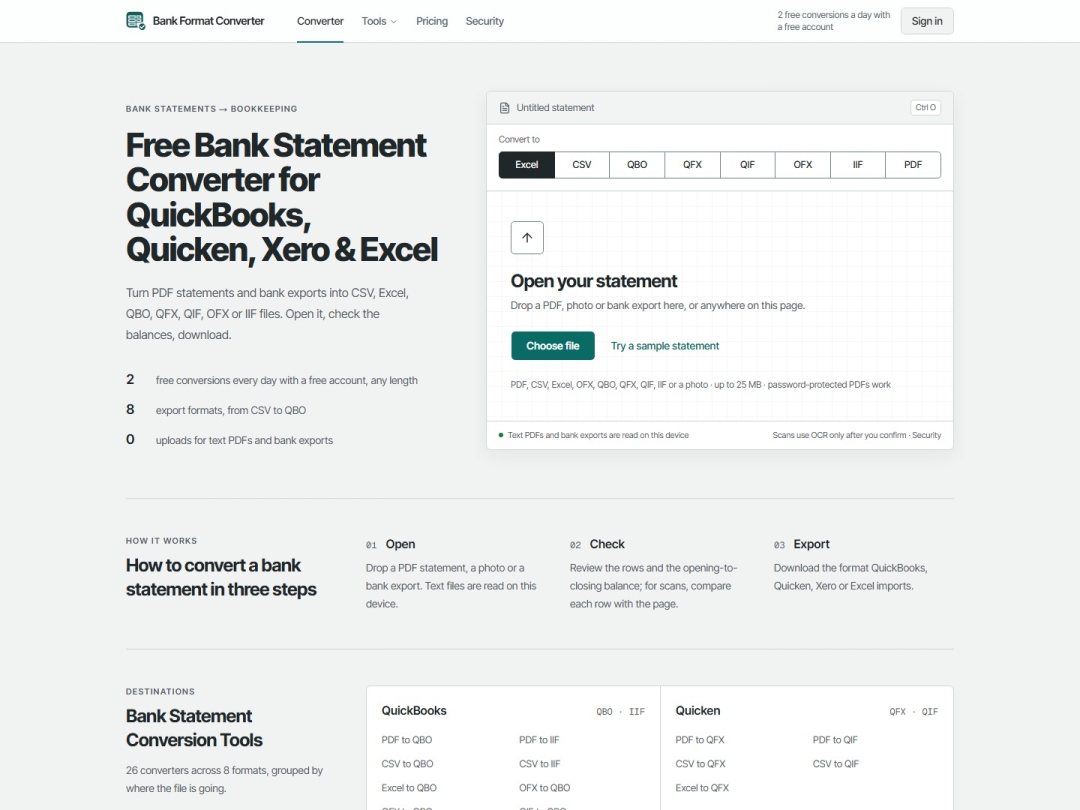
United States – Nov. 18, 2026 – Bank Format Converter, which went live publicly on November 16, 2026, gives small business owners, bookkeepers, and tax preparers a way to convert PDF bank statements into clean accounting spreadsheets without uploading sensitive transaction histories to remote servers. Text-based PDFs and standard bank exports run strictly inside the visitor’s browser, checking opening and closing balances before download.
Anyone reconciling older business accounts runs into the same wall. Banks keep archived monthly statements inside PDF files long after online transaction export windows close. Copy-pasting rows out of a PDF table breaks dates across columns, merges running balances with deposit amounts, or flips withdrawals into positive numbers. Sending confidential corporate or personal statements to opaque web converters introduces a separate compliance risk because most free utilities say almost nothing about where uploaded files go.
Bank Format Converter separates standard digital files from scanned paper documents. Text-based PDFs up to 25 MB, including password-protected statements unlocked strictly inside the browser, never leave the user’s computer during parsing. Structured exports in CSV, Excel, OFX, QBO, QFX, QIF, and IIF also stay client side. Visitors can drop a statement onto the page or load the built-in sample statement, inspect every extracted row in the PDF to Excel converter or PDF to CSV converter, and check totals before creating an account.
“Bookkeepers do not want to guess which server kept a copy of a client’s payroll checking statement,” said a spokesperson for Bank Format Converter. “Processing digital statements directly in the browser means sensitive ledger data stays on the user’s own machine unless they explicitly ask for OCR on a paper scan.”
Disclosed in-memory OCR for scanned paper statements
Digital extraction fails when an old statement is a flat image scan or a smartphone photo. For those files, Bank Format Converter keeps server-side optical character recognition strictly opt in.
Before any scan travels over HTTPS/TLS, the interface displays a confirmation screen naming every active processing provider on that request. Once the user selects Send for OCR and continue, the API server routes the file in memory to Microsoft Azure AI Document Intelligence to capture printed text and page coordinates, then uses Anthropic’s Claude (directly via Anthropic, on Microsoft Foundry, or through ZenMux) to structure rows into dated transactions.
Temporary Azure analysis artifacts are flagged for immediate deletion as soon as the server reads the coordinates, and the application retains neither the uploaded image nor the parsed rows afterward. Extracted amounts and dates are checked back against scanned page text, highlighting uncertain figures so a preparer knows which lines deserve a manual glance. Free scan uploads pass through Cloudflare Turnstile bot screening, while account sign-in via Google or email link uses Google Firebase Authentication and leaves statement files untouched. Product analytics track page flow while stripping file names, transaction lines, email addresses, and user IP addresses, and US CCPA/CPRA or EU/UK GDPR deletion requests are handled via support@bankformatconverter.com; full details appear on the security and data handling page.
Automated balance checks and format flexibility
Formatting errors cost real hours when a missed negative sign throws off a quarterly reconciliation. Because Bank Format Converter does not depend on brittle bank-specific templates, it handles varied statement layouts while relying on mathematical checks rather than guesswork.
Whenever a source PDF includes both opening and closing balances, the converter calculates Opening plus Deposits minus Withdrawals against the printed Closing figure and flags any discrepancy right in the review pane before download. Users converting statements for Xero, spreadsheet audits, or open-banking applications can inspect rows in the PDF to OFX tool or switch among Excel, CSV, QBO, QFX, QIF, and IIF without re-uploading the source file.
Checking parsed transactions in the browser is open to everyone without signing in. Downloading converted files requires a free account, with no credit card needed, unlocking two free converted statements per day of any page length, scanned pages included. Free quotas reset at midnight UTC, and failed conversions never deduct from a user’s allowance. Re-exporting the exact same file into a second format does not double count because the system tracks a one-way SHA-256 fingerprint of the file rather than storing statement contents.
Clear pricing tiers and honest processing limits
Higher-volume accounting practices and year-end catch-up projects can subscribe to Starter at $15 per month for 500 pages, Professional at $30 per month for 1,250 pages, or Business at $50 per month for 5,000 pages. Annual billing lowers per-page rates by half and unlocks all annual pages upfront at $90, $180, or $300 per year to cover concentrated tax deadlines without monthly caps. One page equals a single PDF page or up to 50 rows of tabular data. Paid tiers carry no automatic overage fees, unused pages expire at the end of the billing cycle, and subscribers can cancel anytime from Manage billing or request a full refund within seven days if no paid pages from that period have been spent.
What the converter will not do matters just as much for accounting hygiene. Bank Format Converter reformats legitimate statement data supplied by the user; it never fabricates bank statements, hosts editable templates, or edits account balances. Formats lacking opening and closing totals, including standard OFX, QBO, QFX, QIF, IIF, and spreadsheets missing a balance column, cannot auto-reconcile mathematically. Even when opening and closing math checks out, automated parsers and OCR can still misread a transaction date or merchant description, so preparers stay responsible for inspecting downloaded rows before posting to books or filing tax returns.
About Bank Format Converter
Bank Format Converter provides browser-first statement conversion across 26 dedicated tools and eight financial file formats. Launched on November 16, 2026, the service pairs local client-side parsing for digital files with transparent in-memory OCR and pre-download balance checks so bookkeepers, CPAs, and individuals can prepare clean accounting imports without guesswork.
Media Contact
Company Name: Bank Format Converter
Contact Person: Bank Format Converter Media Relations
Email: Send Email
Country: United States
Website: https://bankformatconverter.com/


