
GenPPT Brings Presentation Creation Into AI Assistants, From Source Documents to PowerPoint
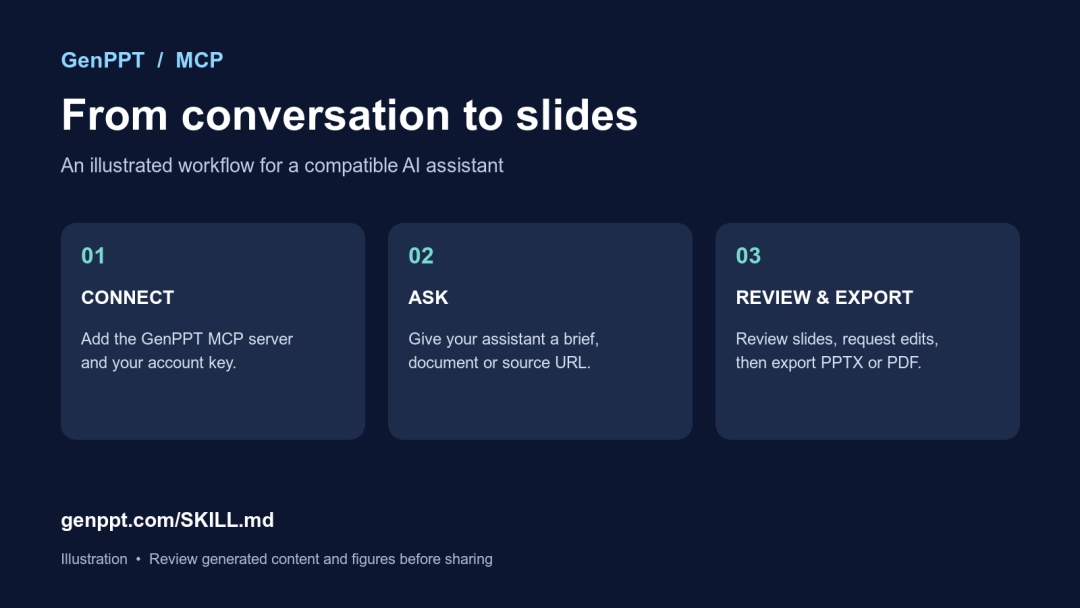
United States – November 16, 2026 – GenPPT has launched a way to turn a conversation with an AI assistant into a presentation or visual carousel. With its new Model Context Protocol (MCP) connection, a user can give a compatible assistant a brief or source document, generate slides, ask for changes and export the result as a PowerPoint file or PDF.
The launch addresses a practical handoff: the work often starts in an AI conversation, but the finished presentation still needs to travel as a file. In GenPPT’s own product data, 74% of 1,085 exports were PowerPoint files, 19% were PDFs and 7% were image sets. The figures cover 3 August to 11 October 2026 and describe GenPPT exports, not the presentation market as a whole. The data and methods are published in GenPPT’s presentation export statistics.
“The idea is simple: if your research and thinking already happen with an AI assistant, you should be able to ask it to make the slides there too. You still get a file you can review and share,” said a GenPPT spokesperson.
How it works
- Create an MCP key in the GenPPT account settings and connect the GenPPT MCP server to a compatible client, such as Claude Code or Cursor.
- Ask the assistant to create a presentation from a prompt, notes, a document or a source URL. For example: “Turn this quarterly report into an eight-slide leadership review, using only the figures in the report.”
- Review the concept, generate the slides and request changes. Export the result to PowerPoint or PDF.
The connection supports presentations and visual slideshows in eight aspect ratios, including widescreen slides and portrait carousels. A direct slideshow can contain up to 25 slides. Setup instructions are at https://genppt.com/SKILL.md and live examples are in the GenPPT presentation showcase.
A test readers can repeat
GenPPT also published the source document and prompt for a small financial-report test. The report describes a fictional coffee company and contains invented figures. In the company’s published test, its eight-slide GenPPT deck retained all eight checked facts. The test is one example, not a guarantee of accuracy; readers should check generated numbers and sources before sharing. GenPPT builds one of the products in the comparison. The report, prompt and results are in GenPPT’s 2026 AI PowerPoint generator benchmark.
About GenPPT
GenPPT is an AI presentation maker and PowerPoint generator that turns prompts and source materials into designed slides. Browse public slide decks at https://genppt.com/s.
Media Contact
Company Name: GenPPT
Contact Person: Media Relations
Email: Send Email
Country: United States
Website: https://genppt.com/contact


